




BLACK FRIDAY

2× credits · Ends Dec 1

Ends Dec 1, 11:59 pm PTGrab 2× credits
Face Slimming

Upload one photo where the face is visible. The face slimming app is set to slim the cheeks and jaw and leave the rest of the photo alone.

Face Slimming
Upload Your Portrait

JPG, PNG or WebP · up to 20 MB · max 6000 px per side

Note
0/200
Public Visibility
Required credits
6
Examples
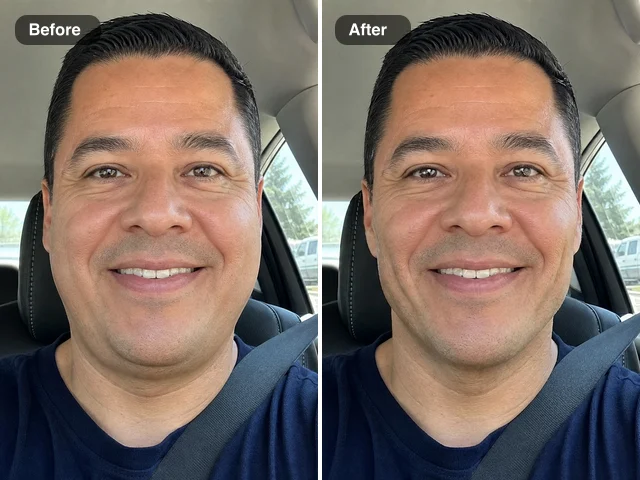
Close wide-angle car selfie before and after face slimming: slimmer cheeks and jaw on the right

More Fixes for the Same Kind of Photo

Other tools in this category, for the next problem in the same picture.

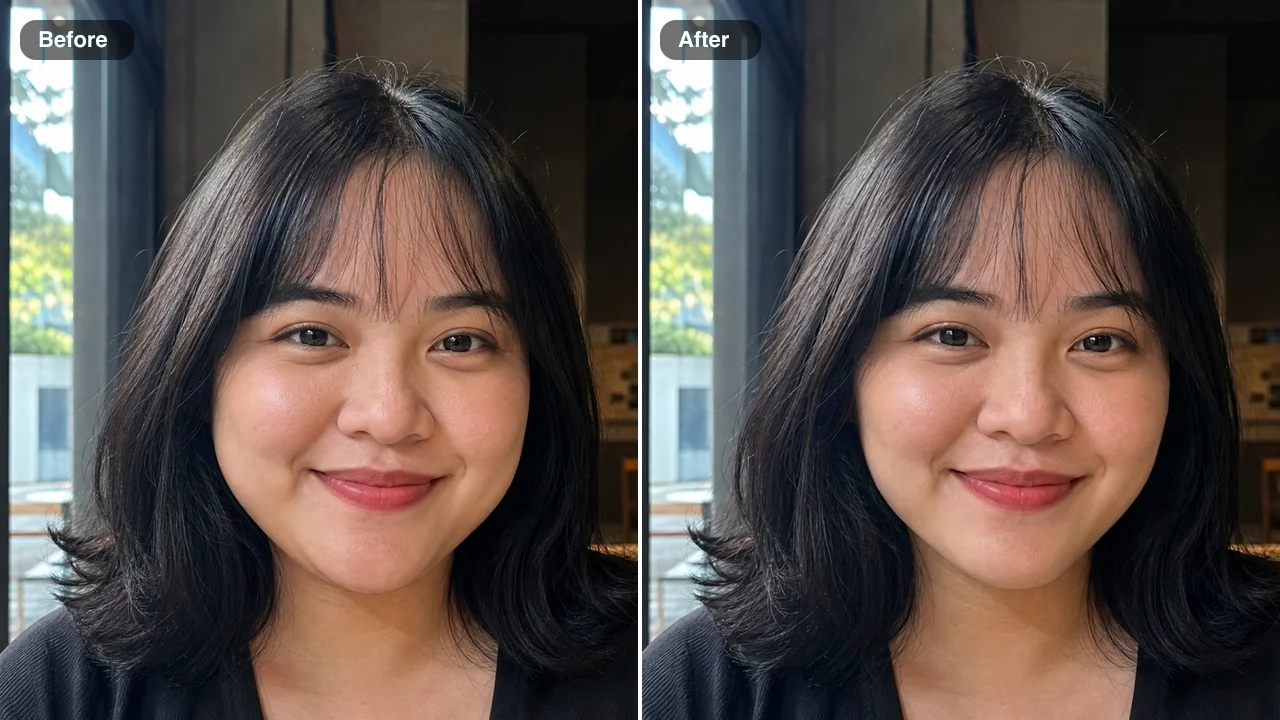
Face Slimming App for a Clearly Slimmer Selfie or Headshot

Same smile, same freckles, same background, with a slimmer face that still looks like you.

Upload one portrait, whether it is a close selfie taken with a wide phone lens, a headshot shot from below or a holiday snapshot. The AI narrows the cheeks and the lower jaw and smooths away fullness under the chin, so the face looks clearly slimmer, with a defined jawline and a softly rounded chin, while the edit is set to keep your eyes, smile, freckles, hair and the background as they are. Add a short note if dimples matter to you, check the result against your original photo, then download what the face slimming app made for a profile, an album or a post.

Slim My Face in a Photo
Before and after: a round-faced woman by a café window, slimmer cheeks and a narrower jaw on the right
Slimmer Wide-Lens Selfies|Freckles and Eyes Kept|Straight Backgrounds|Same Wide Smile

How to Slim Your Face in a Photo with the Face Slimming App

The face slimming app turns one portrait into a slimmer version in three steps: upload the photo, add a note only if something must stay, then check and download.

1

Upload one clear portrait

Add a JPG, PNG or WebP portrait from your phone or computer to the single upload box, or choose one from your Asset Library. A sharp, front-lit face gives the face slimming app the clearest outline to work with, and a portrait where the jaw and chin are visible, with some background around your head, shows the clearest difference. The edit keeps your original framing.

2

Add an optional note and press Edit Image

The slimming instructions are built in, so you can leave the note box empty. If a detail matters, write a few words such as keep my dimples or keep the beard line. Pick Standard or High quality, press Edit Image, and the face slimming app runs the edit with those instructions and your note.

3

Check the result and download it

When the result is ready, check it against your original photo in the upload box. The cheeks and jaw should look clearly slimmer while your eyes, smile and hair match the first photo. Download the portrait or keep it in your Asset Library, and if a detail such as a dimple changed, run it again with a short note naming it.

Free Photo Tools, No Credits Needed

Repair a broken JPG, straighten a photo, make a scan or add an outline for free, with nothing added to your download.

What the Face Slimming App Changes in a Portrait

Every row is an actual before-and-after from the face slimming app: the face outline gets slimmer, while the person and the scene around them stay the same.

A Face Slimming App for Wide-Angle Selfies

Held at arm’s length, a wide phone lens makes the cheeks and jaw look broader, as in this close selfie on a city street in the early evening. The face slimming app narrows both, so the selfie looks less stretched, while his grin, short black hair and the street lights behind him stay as photographed. It is ready for the post you meant to share that evening.
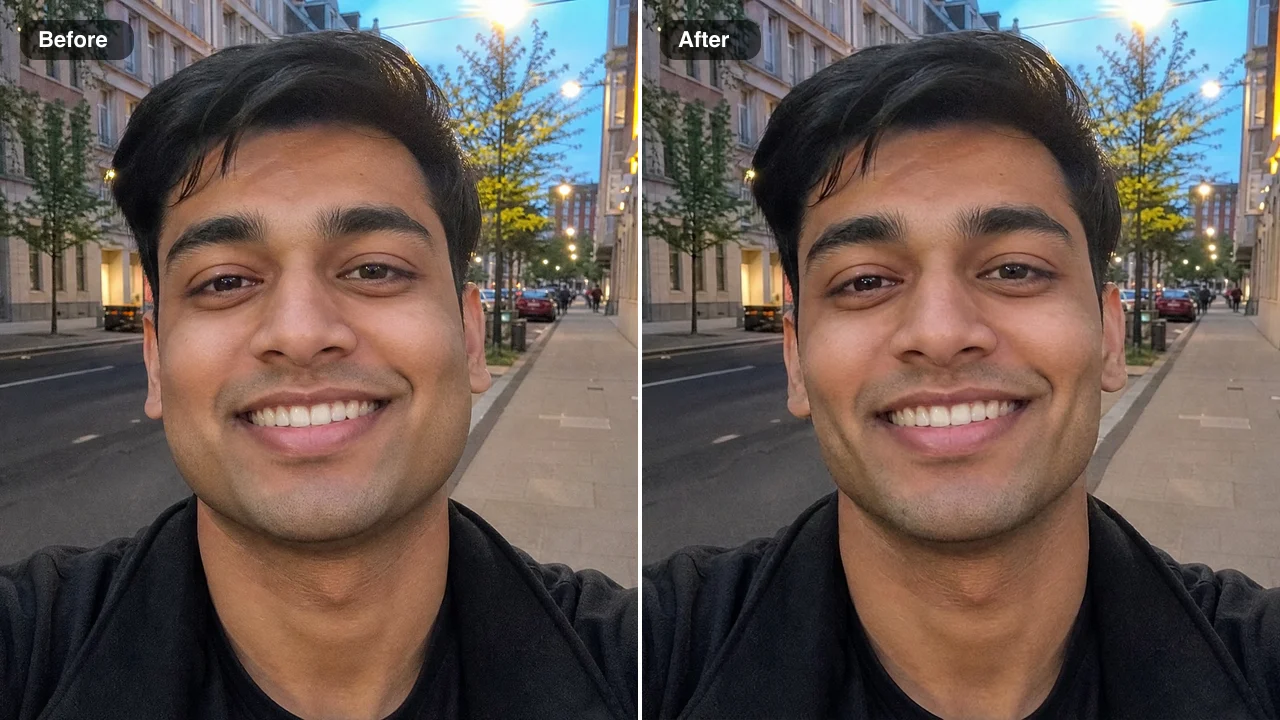
Before and after: a close wide-lens street selfie of a grinning young man, cheeks and jaw slimmer

Freckles, Blue Eyes and Smile Stay Yours

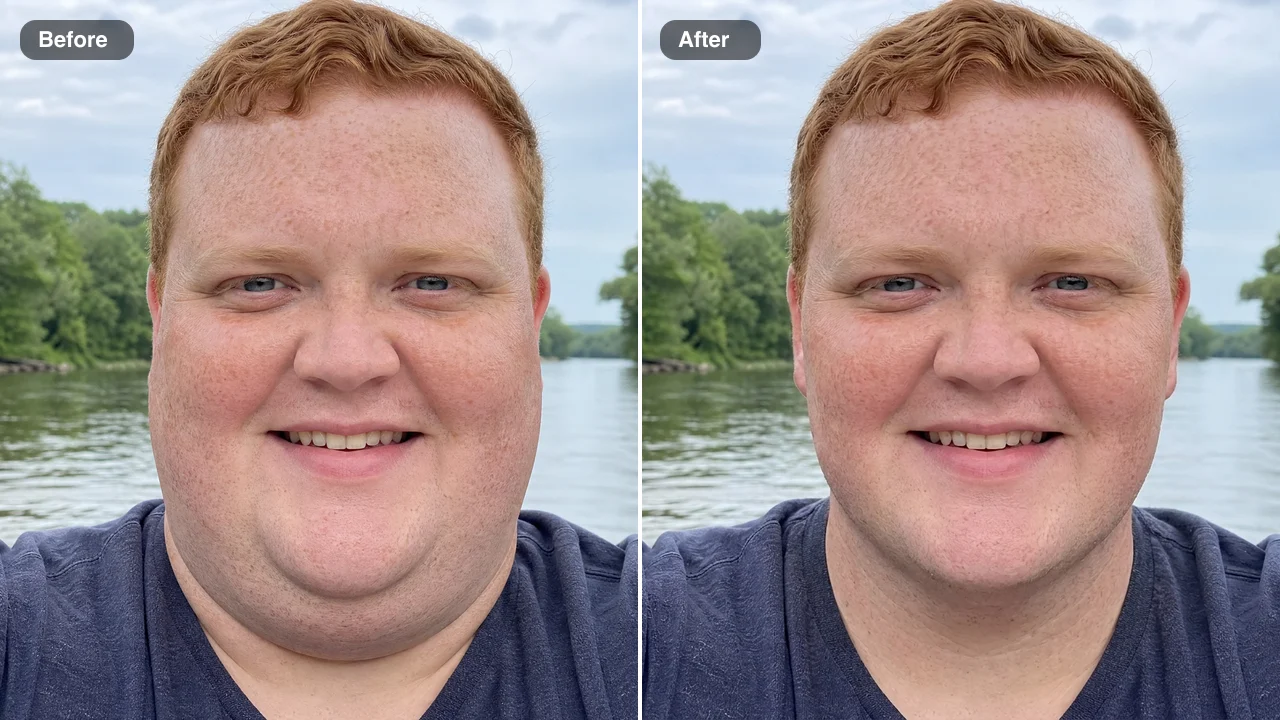
A full, round face with a soft double chin is slimmed here while every freckle, the blue eyes and the easy smile stay as they were. The face slimming app narrows the cheeks and jaw and tightens the area under the chin, while the skin texture and ginger hair match the original. The riverside selfie keeps its soft daylight and gains a cleaner jawline.

Before and after: riverside selfie of a freckled ginger-haired man, double chin smaller and jaw slimmer

A Slim Face Photo Editor That Keeps Walls Straight

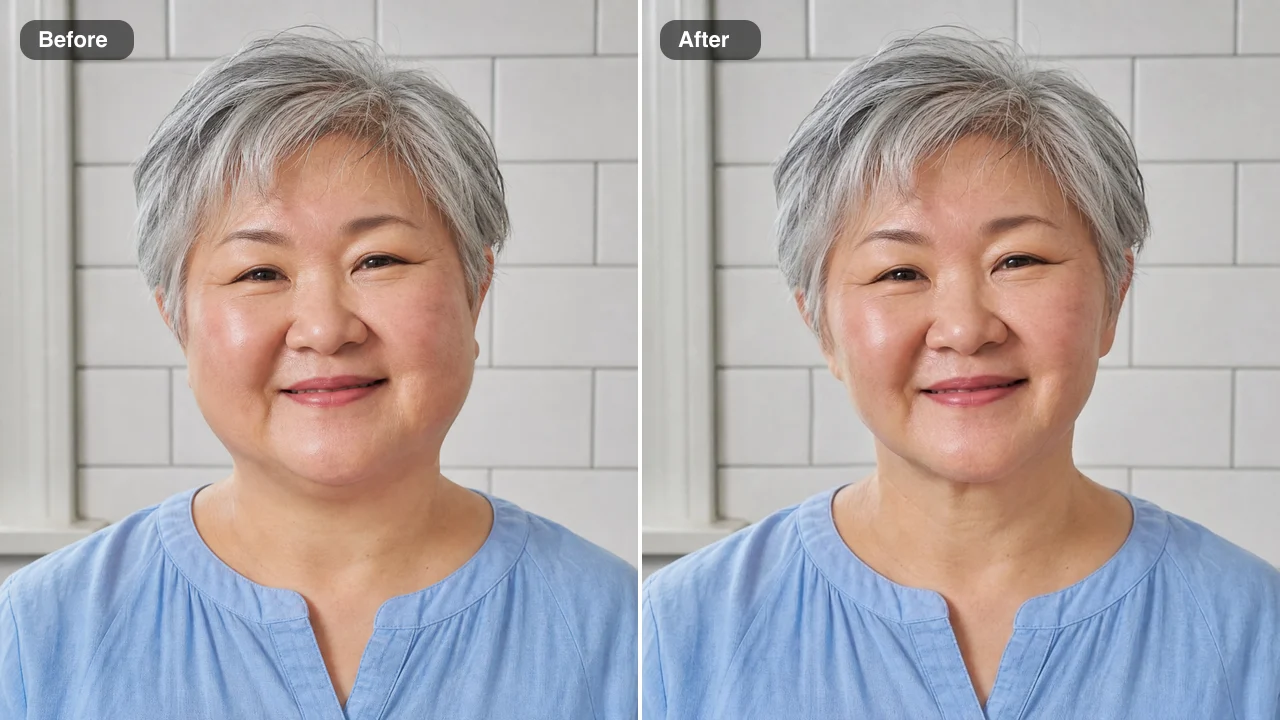
Standing in front of a white tile wall is a hard test for any slim face photo editor, because bent lines give an edit away. In this kitchen portrait of a round-faced woman, the face slimming app narrows the cheeks and jawline while her silver hair, gentle smile, blue blouse, the window frame and every tile joint behind her stay as they were, straight and evenly spaced, so the background gives nothing away.

Before and after: a silver-haired woman by a white tile wall, cheeks and jaw slimmer, tiles still straight

Slimmer Cheeks with the Same Wide Smile

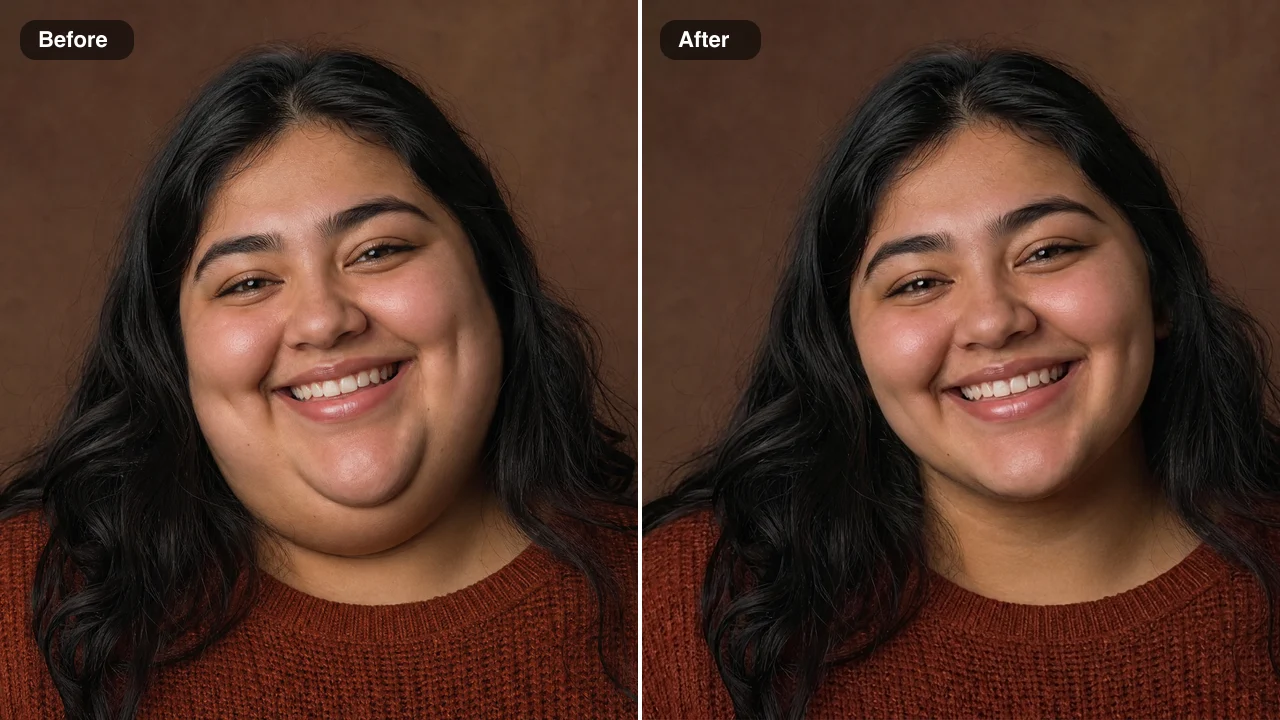
Full cheeks and a wide, toothy smile can come together in studio portraits like this one. The face slimming app slims the cheeks, removes the fullness under the chin and defines the jawline with a softly rounded chin, while the smile, the highlights in her long dark hair, the rust sweater and the warm backdrop stay as they were. The result suits profile pictures, dating apps and party photos.

Before and after: a smiling woman in a rust sweater, cheeks and double chin slimmer, smile unchanged

Face Slimming App Ideas for Selfies, Headshots and Events

People open a face slimming app when a photo they like was taken too close, from below or with a wide lens, and they want the face to look clearly slimmer.

Creators Fixing Close-Up Selfies

A creator who shoots at arm’s length can run the best frame through the face slimming app before posting to Instagram or TikTok. The face looks less stretched by the wide lens, while the outfit, makeup and room stay the same, so the post is ready to share.

Professionals Updating a Headshot

A consultant whose headshot was taken from a low angle can run it through the face slimming app before updating a company website. The jaw looks clearly slimmer while the lighting, suit and background stay as photographed, so the new headshot is ready for LinkedIn or a speaker page.

Wedding Guests Sharing Reception Photos

Reception selfies are usually taken close, at arm’s length. A guest choosing photos for the shared album can slim every visible face in one pass with the face slimming app, then share the album with each guest’s expression, the dance floor and the decorations unchanged.

Friends Posting Group Shots

In group photos taken with a phone’s wide lens, the people at the edges can look fuller in the face. Like a face slimming filter used after the photo is taken, the edit slims every face in one pass, so friends can post the photo to a group chat or a story with every smile and the background unchanged.

What People Say About the Face Slimming App

Arm-length selfies with my phone’s wide lens always made my cheeks look twice their size. I tried the face slimming app on a café selfie from last spring, and my cheeks looked less stretched and the selfie finally felt like one I wanted to post. My freckles, earrings and the latte art in the corner were untouched.

Saoirse Kelleher
Lifestyle Blogger

Face Slimming App FAQ

Clear answers about the face slimming app, from what it costs and which portraits work to what stays the same and how to get the clearest result.

A face slimming app is a photo tool that makes a face look slimmer in a picture you already have. On FixImage you upload one portrait, and the cheeks and jaw are narrowed while your features, expression and background stay the same.

Yes — you can start the face slimming app with free credits. Sign up to claim them, then check in every day, and a seven-day streak lifts the reward to 3x on day 7. A Standard portrait edit costs 6 credits and High quality, available with a subscription or any credit pack, costs 16, and the same balance covers any other AI photo fix on FixImage.

A sharp portrait where the whole face is visible and evenly lit works best with the face slimming app. Front-facing and slightly turned faces both work, and a shot where the jaw and chin are visible, with some background around your head, shows the clearest difference. Upload a JPG, PNG or WebP file.

Yes — AI can make your face look slimmer, and the face slimming app needs no prompt. The slimming instructions are built in, so you only upload the portrait. Standard runs on Nano Banana 2 Lite; High quality runs on Nano Banana Pro for a stronger, cleaner slimming. The optional note box takes up to 200 characters for details such as keep my dimples or keep the beard line.

Yes — the face slimming app slims only the cheeks, jaw and chin, so your eyes, nose, mouth and expression stay yours. Your hair, skin tone, freckles and any beard keep their original look, and your clothes, jewellery and background stay as photographed. The result is a clearly slimmer face that is still recognisably you.

Yes — the face slimming app slims every visible face in a group photo in one pass. Beards, moustaches and stubble stay as thick and as long as they were, and nobody gets facial hair they did not have. For the clearest group result, pick a photo where each face is in focus and turned toward the camera.

You decide who sees your slimmed portraits through the Public Visibility setting above the Edit Image button. Free-plan results start out public, while a subscription or one-time pack lets you keep every result private. Portraits you upload to the face slimming app are used only to make your edit.

The face slimming app keeps your eyes, smile, skin and background as photographed, so the only change is a slimmer face. Straight lines behind you stay straight, because bent walls are what usually give an edit away. Start with a front-lit portrait taken from eye level, check the result against your original photo, and use the note only for a detail you want kept, such as dimples.

Try the Face Slimming App on Your Portrait

Upload one portrait and let the face slimming app slim the cheeks and jawline while your features and background stay put. Check it against your original, then download the slimmer portrait for a profile, an album or a post. Start with the selfie you want to share next.

Slim My Face Now
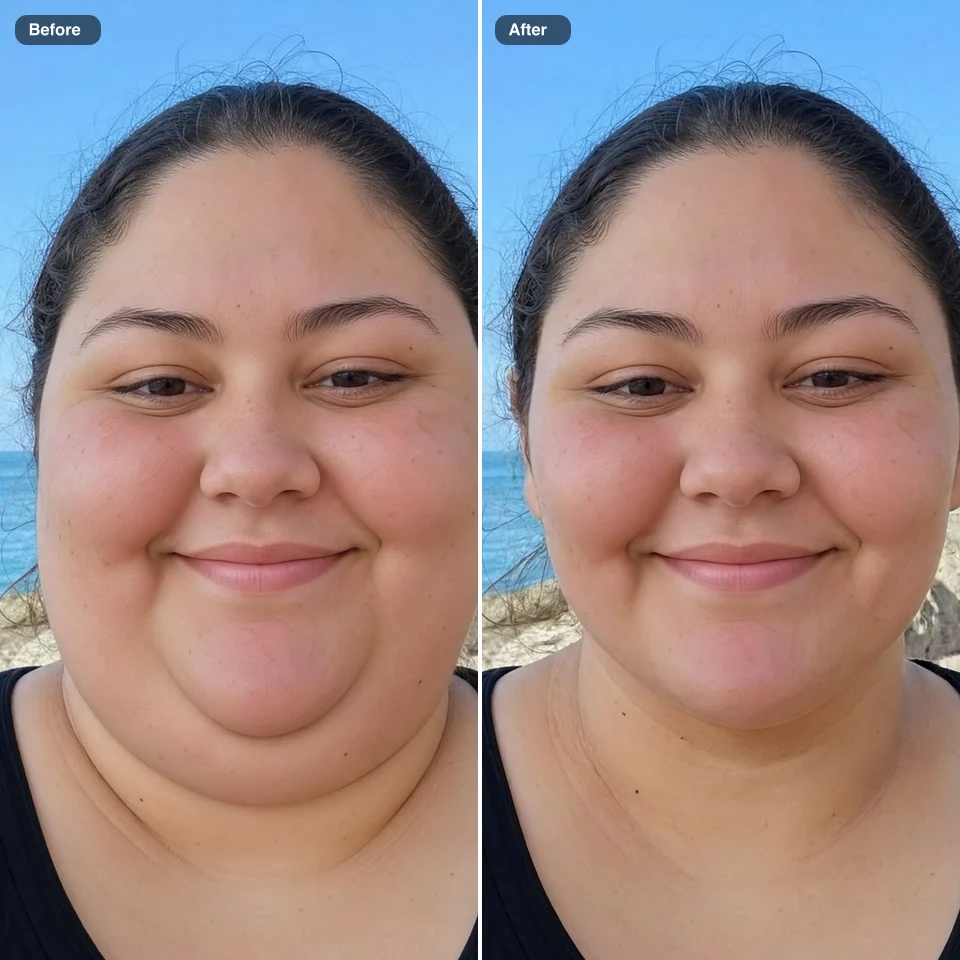
Before and after: a young woman’s seaside selfie, round face and double chin left, slimmer jawline right