














BLACK FRIDAY

2× credits · Ends Dec 1

Ends Dec 1, 11:59 pm PTGrab 2× credits
Remove Glasses Glare

Upload one photo where the lenses catch the light. The edit is set to remove glare from glasses in the photo and leave the frames, face and background alone.

Remove Glasses Glare
Upload Your Photo

JPG, PNG or WebP · up to 20 MB · max 6000 px per side

Note
0/200
Public Visibility
Required credits
6
Examples
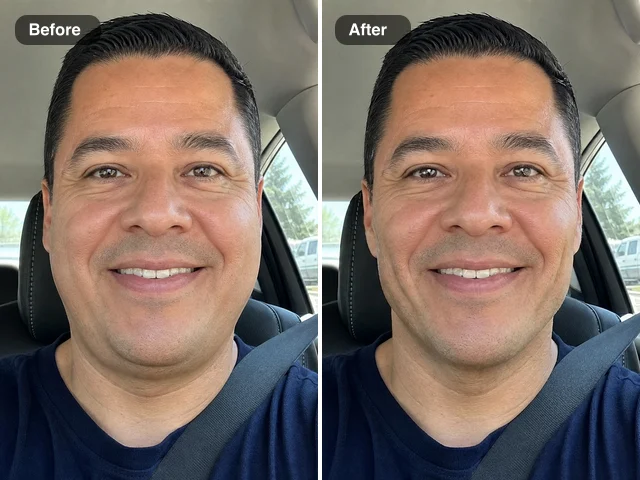
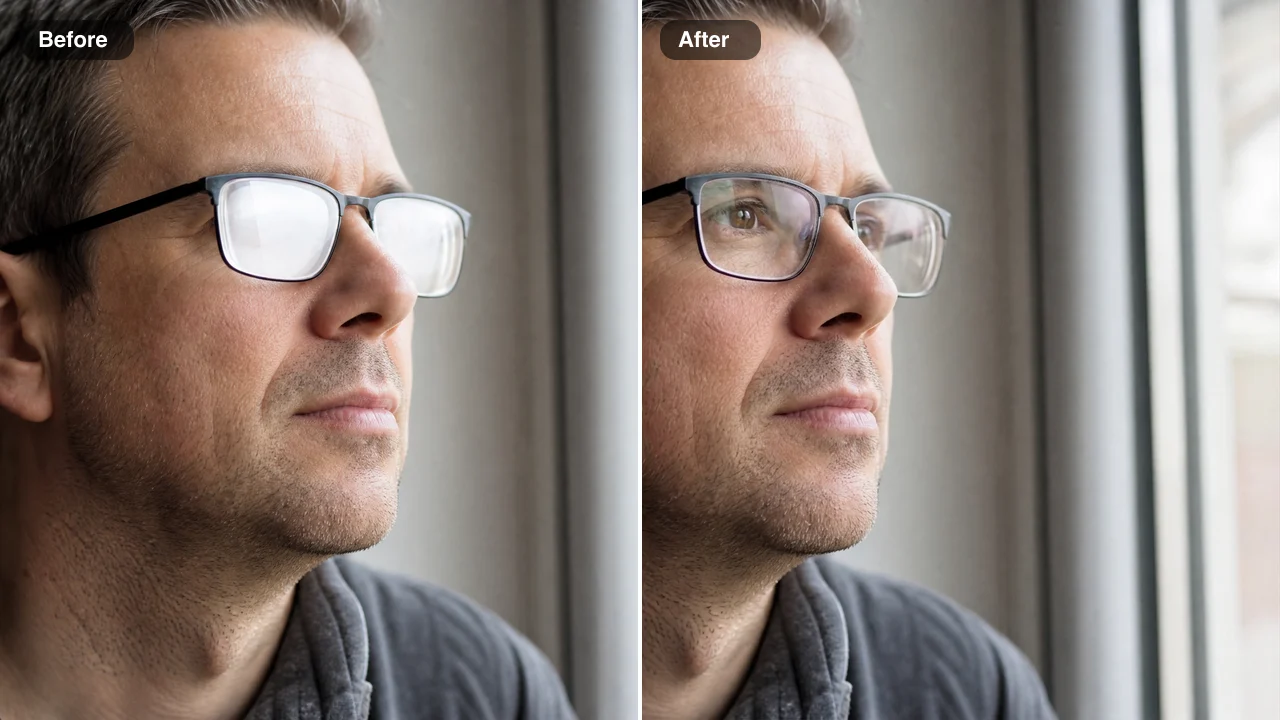
Man in black-framed glasses before and after glare removal: window glare on the lenses left, clear eyes right

Remove Glare from Glasses in Photos and Keep Your Frames

Flash spots and window reflections gone, frames kept, and the eyes behind the lenses visible again.

Upload one photo where glasses catch the light: a party shot with flash hotspots, a portrait by a bright window, a ring-light selfie or a sunny day outdoors. The AI clears the white spots and reflections from both lenses, rebuilds the eyes behind them to match the visible parts of the same eyes, and is set to keep the frames, your expression and the background as they are. Add a note if a detail must stay, then remove glare from glasses in photos you already took and download the result for a headshot, a family album or a profile picture.

Remove Glare from My Photo
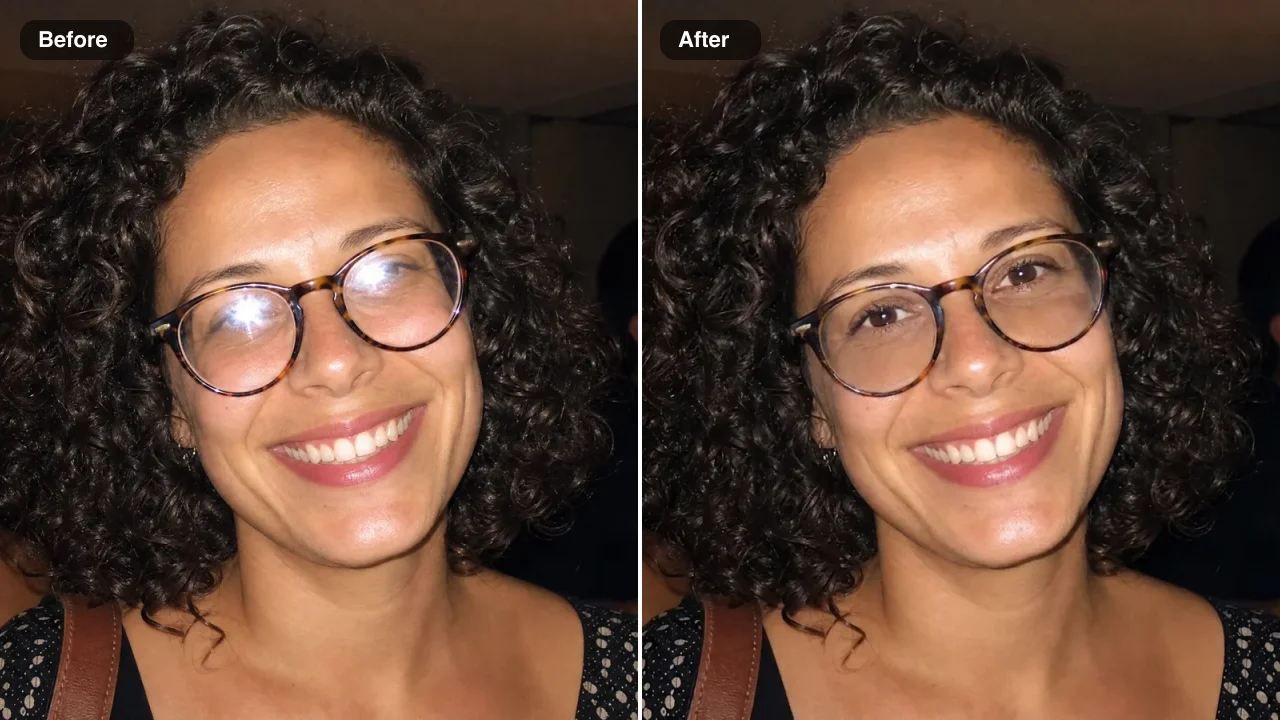
Before and after: a curly-haired woman in round glasses, flash hotspots on the lenses left, clear eyes right
Flash Hotspots Cleared|Hidden Eyes Restored|Frame Colour Kept|Sun Glare Cleared

How to Remove Glare from Glasses in a Photo

To remove glasses glare from a photo, upload the picture, add a note only if something must stay, then compare the clear lenses with your original and download.

1

Upload one photo with the glare

Add a JPG, PNG or WebP from your phone or computer to the single upload box, or choose one from your Asset Library. Flash party shots, window portraits and webcam stills all work, and the sharper the face, the more accurate the eyes when you remove glare from glasses in a photo. The edit keeps your original framing.

2

Add a note and press Edit Image

The glare removal instructions are built in, so the note box can stay empty. If something matters, write a few words, such as keep the gold frames or keep the thin metal bridge. Pick Standard or High quality and press Edit Image to remove glare from glasses in the photo.

3

Check the eyes and download

When the result is ready, compare it with your original. The lenses should look clear, and the eyes should match the face in colour, shape and gaze. Download the photo or keep it in your Asset Library, and if a frame detail should stay closer to the original, run it again with a short note.

Free Photo Tools, No Credits Needed

Repair a broken JPG, straighten a photo, make a scan or add an outline for free, with nothing added to your download.

Fix Glare on Glasses in Photos, Whatever the Light Source

Each row shows an actual before-and-after: you can fix glare on glasses in a photo lit by flash, a window, a ring light or the sun, while the rest of the picture keeps its look.

Remove Glare from Glasses in a Photo Taken with Flash

At this indoor party, a direct camera flash left bright white hotspots on both lenses of her clear frames. Here you can remove glare from glasses in a photo like this one: both spots clear, the eyes behind them are rebuilt to match her face, and the curly hair, the laugh and the party lights stay as they were, ready for the shared party album.
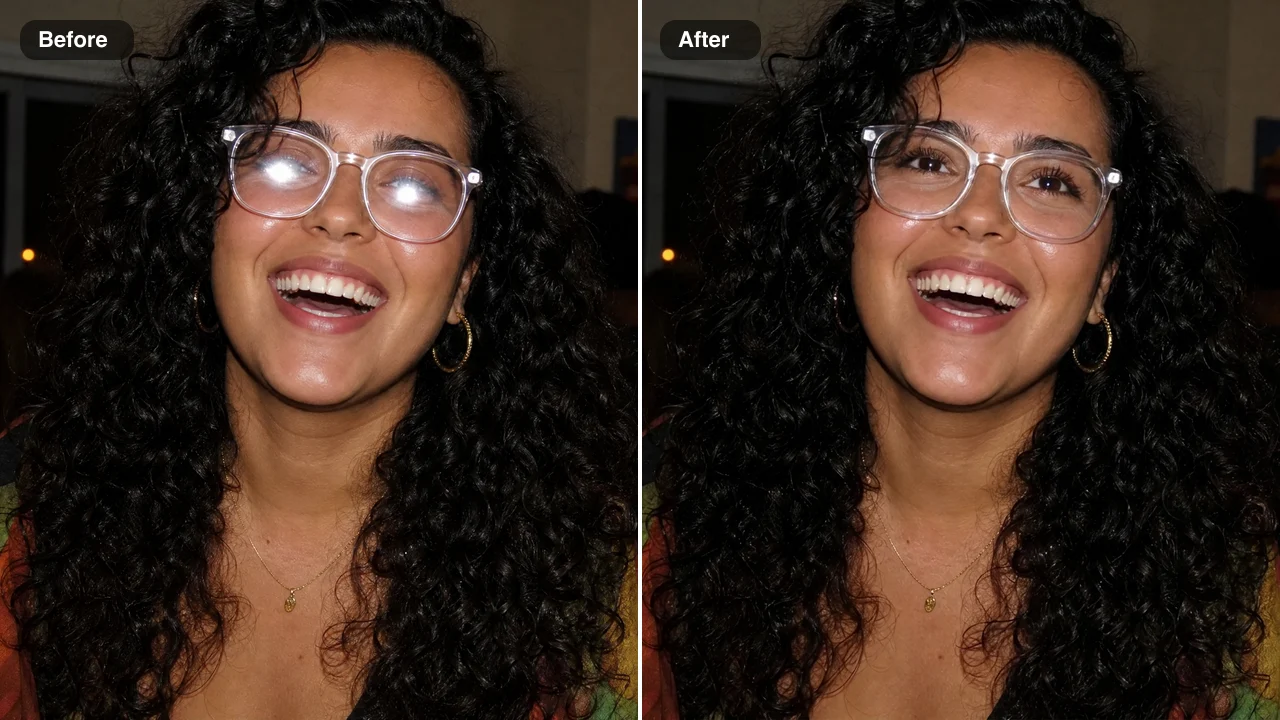
Before and after: a laughing woman with curly black hair at a party, flash hotspots removed from her glasses

Eyes Restored When Window Light Hides Them

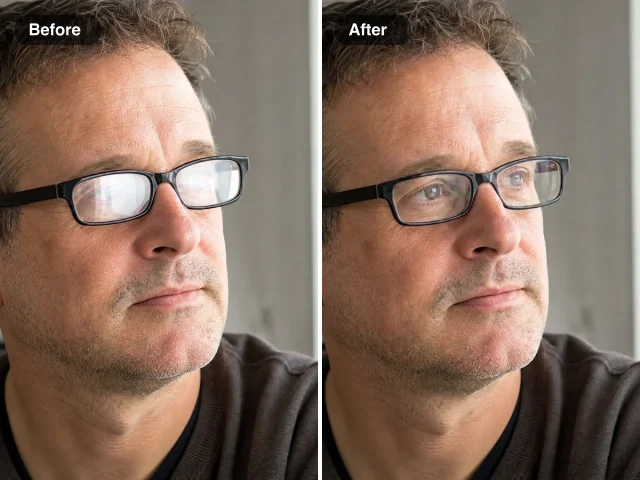
Facing a bright window, his thin black glasses turned almost solid white and hid both eyes. After the edit, the lenses are clear and his eyes appear with a natural gaze that matches the rest of his face. To remove glare from glasses in a photo where the reflection covers most of the lens, a sharp, front-lit face gives the closest likeness.

Before and after: a man in thin black glasses by a window, white reflections cleared so his eyes are visible

Bold Red Frames Keep Their Colour and Shape

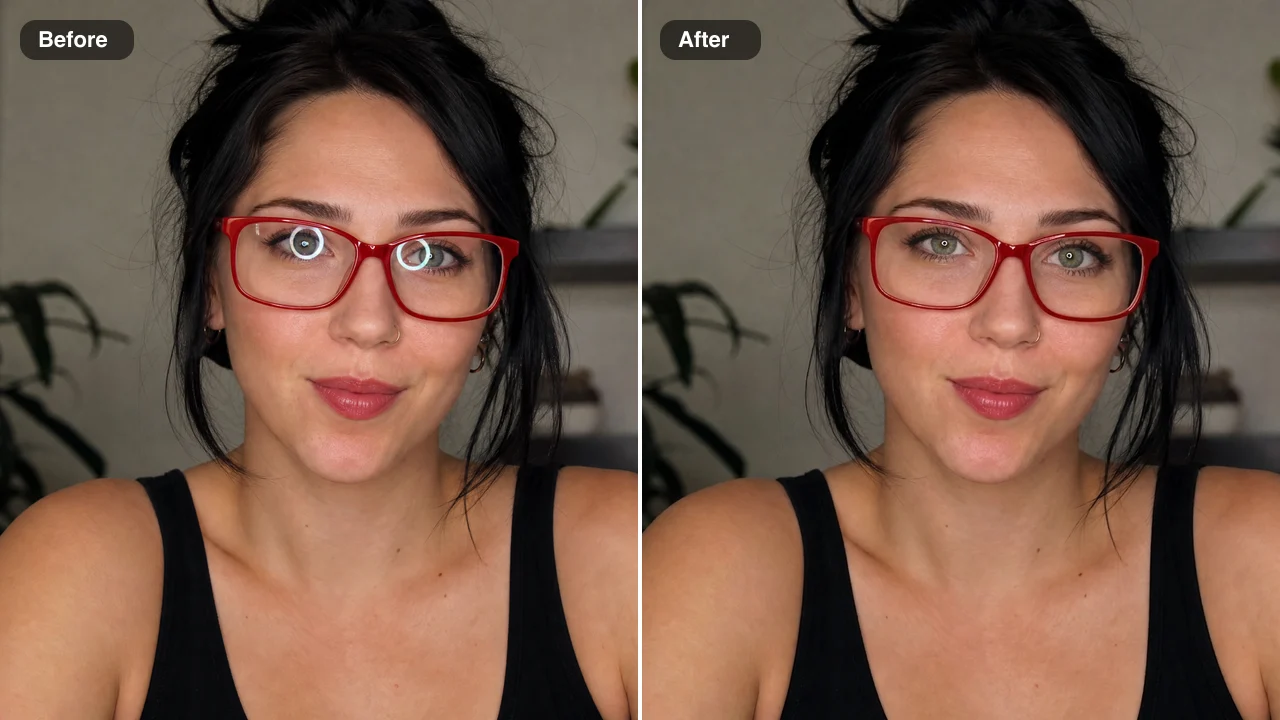
Ring lights leave a bright circle on each lens, as in this creator’s portrait with bold red rectangular glasses. When you remove glare from glasses in a photo like this, both rings clear while the frame colour, shape and position stay the same, so the glasses still look like hers. Her thumbnails and profile pictures keep the same red frames viewers know.

Before and after: a woman in bold red glasses, ring-light circles cleared from both lenses, red frames kept

Sun Glare Cleared from Lenses Outdoors

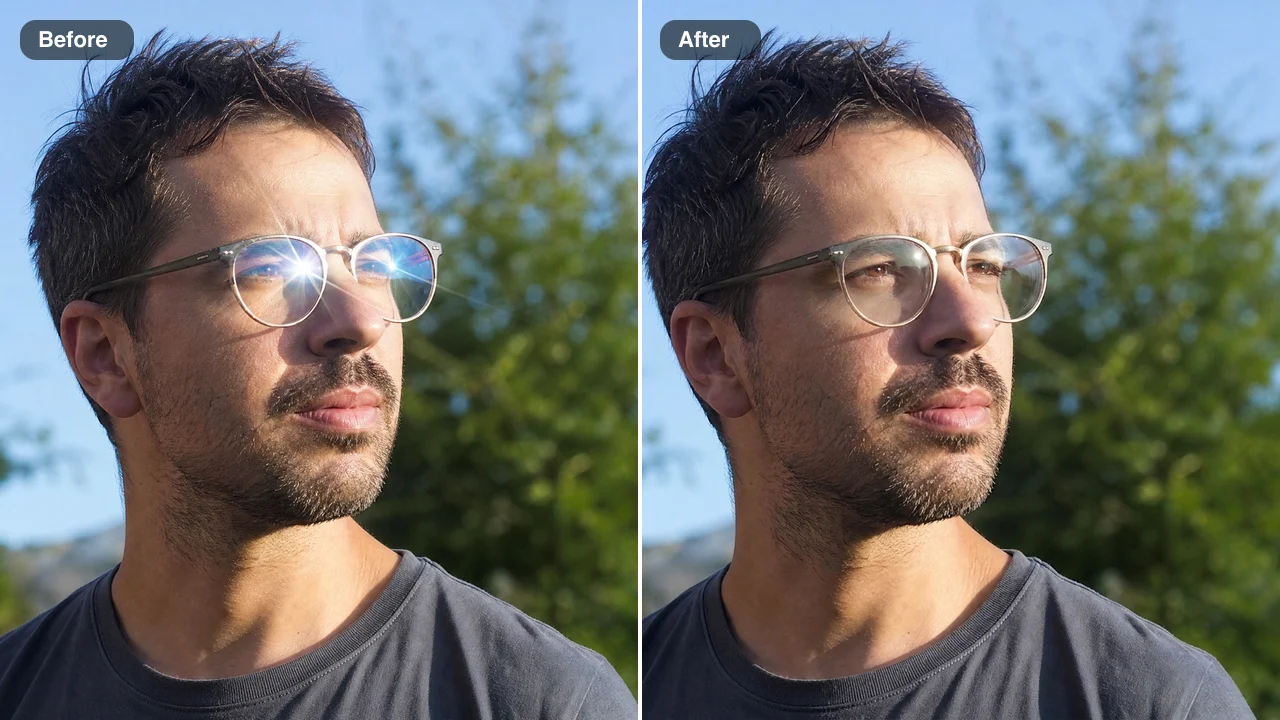
Bright sun left a starburst and streaks across both lenses of his thin metal frames outdoors. The edit clears the streaks so his eyes show, keeping the frames, his stubble and the trees behind him, with only a soft highlight left near one edge. A holiday or travel shot keeps its bright-day mood, now with visible eyes.

Before and after: a man outdoors in thin metal glasses, a sun starburst cleared from the lenses so his eyes show

Remove Glasses Glare from Photos for Headshots, Albums and Calls

People look for a way to remove glasses glare from a photo when the picture matters and the moment has passed, as in these four situations.

Families Saving a Flash Photo

A birthday dinner photo can have one person whose lenses caught the flash. A parent can remove glare from glasses in a photo like that before posting it or sharing it in the family chat, while every face, the table and the decorations stay as they were.

Remote Workers Fixing Webcam Stills

A laptop screen reflects as a bright box on glasses during video calls. A remote worker can grab a webcam screenshot, remove glare from glasses in the photo, and use the clear-eyed still on a team page, a chat profile or a conference speaker card.

Job Seekers Updating Headshots

Office headshots taken near windows can hide the eyes behind reflections. A job seeker can remove glasses glare from a photo already taken, keep the suit, background and expression, and upload the result to LinkedIn or a résumé site with no need to book another shoot.

Grandchildren Preparing Memorial Slideshows

An older family photo of a grandparent in glasses can carry window or sun reflections. Before it goes into a slideshow or a memorial video, a grandchild can remove glare from glasses in the photo, so the eyes show again, matched to the rest of the face.

What People Say About Removing Glare from Glasses in Photos

My grandmother wore round gold glasses in nearly every picture, and the kitchen window bounced off them in most. For her ninetieth birthday slideshow, I wanted to remove glare from glasses in a photo I had scanned from 1998. Her eyes appeared again, matched to her face, and the gold frames looked exactly like I remember.

Margit Halvorsen
Family Historian

Remove Glare from Glasses in Photos: Questions

Answers to what people ask before they remove glasses glare from a photo: the cost, the best photos, what stays the same and how to keep the eyes natural.

A glasses glare remover is an AI tool to remove glare from glasses in a photo so the eyes behind the lenses show again. Here you upload one picture, and flash spots and window or screen reflections clear from the lenses while the frames, your face and the background stay as photographed.

You can start with free credits by creating a FixImage account. Then check in each day, and a streak lifts the reward up to 3x on day 7. A Standard edit to remove glasses glare from a photo uses 6 credits, so the free balance covers your first pictures and any other AI fix on the site; High quality, available with a subscription or any credit pack, uses 16.

A sharp photo with the face and glasses in focus works best. A clear view of part of each eye gives the most accurate eyes, and flash, window, screen, ring-light and sun reflections all work; upload a JPG, PNG or WebP.

Yes — AI can remove glare from glasses in a photo, and here the instructions are already built in. You only upload the picture: Standard runs on Nano Banana 2 Lite and High quality on Nano Banana Pro, and an optional note of up to 200 characters covers details such as keep the gold frames.

Your frames keep their shape and colour, and your eyes are rebuilt to match their visible parts. Shape, iris colour, gaze, lids and brows follow the same eyes. The edit is built to remove glasses glare from a photo and leave the face, expression, hair and background as they were. Open the result and check the eyes against your original photo before you download.

Yes — you can fix glare on glasses in a photo from a webcam or a video call screenshot, just like any other picture. A screenshot where the face fills most of the frame gives the sharpest eyes, and the frames keep their shape and colour.

You decide who sees it with the Public Visibility setting above the Edit Image button. Free-plan edits begin as public, and with a subscription or one-time pack you can turn the setting off and keep each edit private. Each upload is used only to produce your edit.

Pick the sharpest version of the photo you have, ideally one where part of each eye still shows through the glare. Open the result and check the eyes against your original photo, and if a detail such as a frame colour should stay closer to the original, run it again with a short note.

Clear the Glare from Glasses in Your Photo

Upload one shot where the lenses caught the light, and a single edit will remove glare from glasses in the photo: the eyes show again, while the frames and face stay the same. Compare it with your original, then download it. Start with the picture where the eyes matter most.

Clear My Lenses
A smiling grandmother in round gold glasses in a sunny kitchen, lenses clear after glare removal