BLACK FRIDAY

2× credits · Ends Dec 1

Ends Dec 1, 11:59 pm PTGrab 2× credits

Fix Lighting & Color Tools

  • Remove Shadow from PhotoComing soon
  • Image Hue ChangerComing soon

Fix Lighting in Photo Portraits: Glare and Reflections

Light problems in a photo come in several kinds: glare on eyeglasses, flash hotspots, backlight that darkens a face, harsh shadows and color casts. Today you can fix lighting in photo portraits with AI when the problem is glare on eyeglasses. Remove Glasses Glare clears flash hotspots, window light and screen reflections from the lenses and restores the eyes behind them, while frames, face and background stay as they were. Upload one picture and compare the edit before you download it.

Browse the Tools
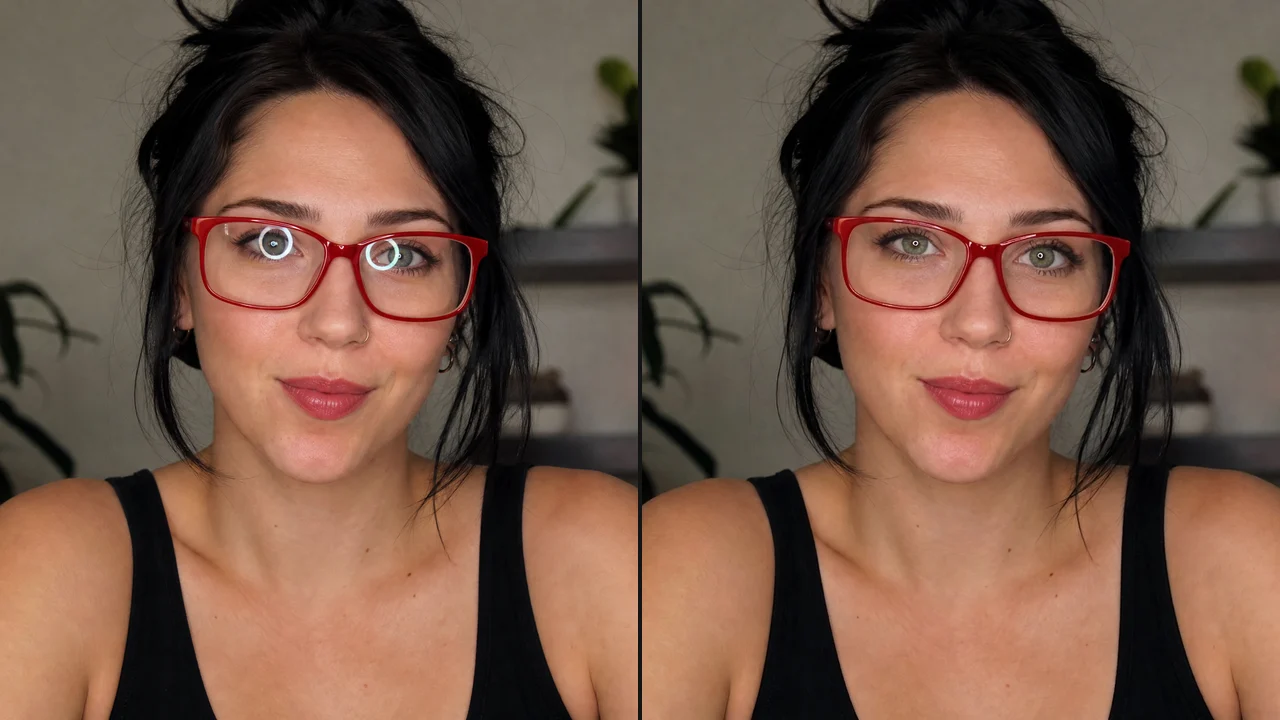
Before and after: a woman in red glasses with ring-light glare on both lenses, then the glare cleared

Start with the Light Problem in Your Picture

Glare, flash hotspots, backlight, shadows and color casts each call for a different fix. Glare on eyeglasses is the one covered today, and the row below shows how to fix lighting in photo portraits that have it, without a general editor or a written prompt.

Glare and Reflections on Glasses

A camera flash, a bright window or a laptop screen can bounce off lenses and hide the eyes in an otherwise good portrait. To fix lighting in photo headshots, event pictures and webcam stills where glasses caught the light, Remove Glasses Glare clears those hotspots and rebuilds the eyes behind them while the frames, face and background stay unchanged.
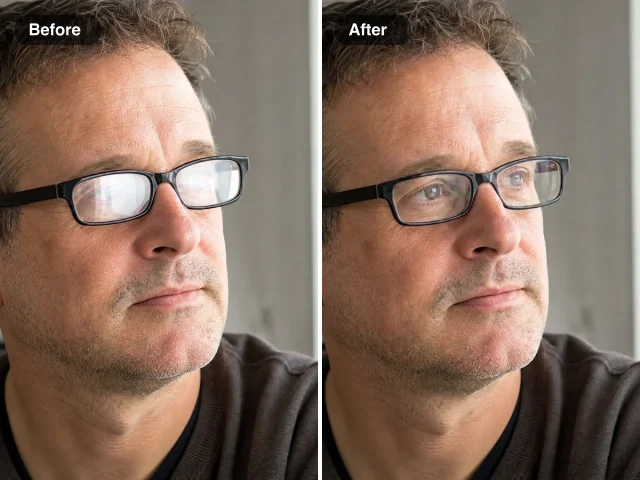

Man in black-framed glasses before and after glare removal: window glare on the lenses left, clear eyes right

How to Fix Lighting in Photo Portraits with AI

To fix lighting in photo portraits here, you confirm the glare sits on the lenses, upload one picture and compare the AI edit with your original.

1

Spot the glare on the lenses

Look for flash hotspots, white ring-light circles or blue screen rectangles on the glasses; that is the light problem Remove Glasses Glare clears. The tool already carries its own instructions, so you can fix lighting in photo shots without sliders, masks or a written prompt.

2

Upload one clear picture

Add a JPG, PNG or WebP where the face is in focus and the glare sits on the lenses. Type a short note if a detail matters to you, such as gold frames; Standard runs on Nano Banana 2 Lite, High quality on Nano Banana Pro, and both keep your framing.

3

Check the eyes, then download

Once you fix lighting in photo portraits this way, check the result against your original, looking closely at the eyes and the frames. When it looks right, save the picture or keep it in your Asset Library; if a hotspot remains, add a clearer note and run it again.

When to Fix Lighting in Photo Portraits Instead of Reshooting

People fix lighting in photo files like these instead of asking everyone to pose again.

Ring-light headshots

Ring lights and office windows leave bright circles on glasses in LinkedIn photos and team pages. Fix lighting in photo headshots like these to bring the eyes back, and keep the pose, outfit and background you already chose for every profile.

Flash photos from events

Direct flash at weddings, birthdays and church events turns lenses into white hotspots. Fix lighting in photo albums before you share them, so each guest’s eyes are visible while the venue, the outfits and everyone else stay as captured.

Webcam and class stills

Screens reflect as blue rectangles in glasses during calls and online classes. Clean up a still for a course page, a company newsletter or a speaker bio so viewers can see your eyes and the screenshot reads as a proper portrait.

Family snapshots outdoors

Sun or a lamp caught in a grandparent’s glasses can spoil a favourite family picture. Fix lighting in photo memories for a slideshow, a family chat or a shared album so everyone looks the way you remember them on that day.

Stories from People Who Fix Lighting in Photo Portraits

Office shoots under strip lights leave white bars across every pair of glasses, and retakes are rarely possible. I now fix lighting in photo sets like these with the glare tool before delivery. On a recent job for a law firm, eleven of fourteen headshots needed it, and the frames and eye colour stayed exactly as captured.

Felicity Ng
Corporate Photographer

Fix Lighting in Photo FAQ

Answers on how to fix lighting in photo portraits with AI, what each edit keeps, which light problems are covered and what it costs.

When the bad light is glare on eyeglasses, fix lighting in photo portraits by uploading one clear picture to Remove Glasses Glare and starting the edit. The AI clears the reflections and keeps the frames, face and background; then you compare the result with your original and download it.

Glare on eyeglasses is the lighting problem you can fix here today. To fix lighting in photo portraits where glasses caught the light, Remove Glasses Glare clears flash hotspots, window reflections, ring-light circles and screen glare on lenses. Shadow removal and hue changes come later, as separate tools on this page.

Remove Glasses Glare changes only the area it targets: the lenses and the eyes behind them. When you fix lighting in photo portraits here, faces, frames, clothing and backgrounds stay as they were, and a short note can point out details such as gold frames.

To fix lighting in photo portraits accurately, start with a sharp picture where the face is in focus and the glare sits on the lenses rather than across the whole frame. Upload a JPG, PNG or WebP; the edited picture keeps the aspect ratio of your original.

Yes — you can start with free credits: sign up and they are added to your account, and daily check-ins add more. A Standard Remove Glasses Glare edit uses 6 credits, and High quality, available with a subscription or any credit pack, uses 16; the cost appears next to the Edit Image button before you start.

When you fix lighting in photo portraits, the Public Visibility switch on the Remove Glasses Glare page decides who sees each edit. Free-plan results begin as public, while a subscription or one-time pack keeps every edit private. The photo itself is used only to make the edit you asked for.

Clear Glare and Fix Lighting in Photo Portraits

Upload one portrait to Remove Glasses Glare, let the AI clear the hotspots on the lenses and compare the eyes with your original. When they look right, download the portrait for a headshot, an event album or a family frame and fix lighting in photo portraits without asking anyone to pose again.

Open Remove Glasses Glare
A smiling grandmother in round gold glasses in a sunny kitchen, lenses clear after glare removal